A Simulator, and the Five Bugs That Only Showed Up Once I Flew It
I added the MAVLink adapter and the tests passed. Then I built a tiny simulator so I could actually watch a vehicle fly — and within ten minutes it handed me five real bugs the green test suite never caught. One of them crashed the whole console.
The morning's work — teaching the console to speak MAVLink, the protocol real autopilots use — ended with green tests. Arm, take-off, land, all mapped. The codec round-tripped. The adapter connected to a fake link and behaved. Done, on paper.
Then I built a small simulator so I could actually watch a vehicle fly, pointed the console at it, and within ten minutes it had handed me five real bugs. Ang test, pumapasa. Ang paglipad, nagturo (the tests passed. The flying taught).
First, what the simulator is — and isn't
There are two honest ways to fly this console without a drone. One is the real thing in software: the actual autopilot flight stack running on your machine, speaking the real protocol. That's PX4 SITL, and I haven't done it yet — it's written up as a guide, not a result.
The other, which I built today, is a mini-simulator. A tiny stand-in that streams valid protocol messages to the console and serves a small web dashboard: a plan view with the vehicle and its track, altitude and battery gauges, and buttons. You run it, open a browser tab, press CONNECT in the console, and both windows show the same aircraft climbing.
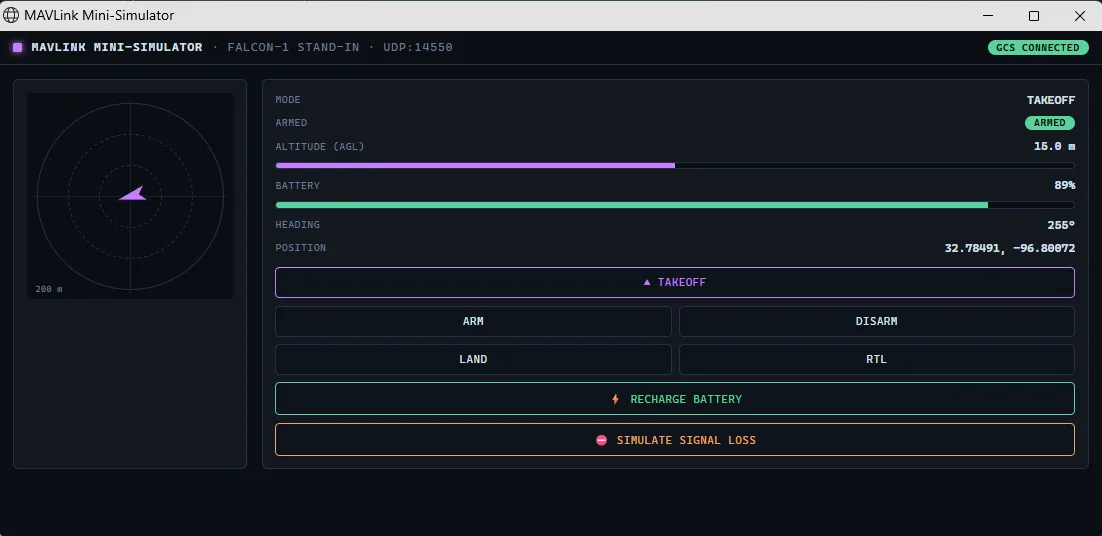
I built it to demo. What it actually did was test — much harder than my tests had.
The five
1. It crashed the whole console when the heading hit zero. The vehicle drifted, its heading swept through 360° back to 0 — and the console's main process threw an uncaught error and died. The protocol trims trailing zero bytes off a message to save space. When the heading, which is the last field, became zero, the message got shorter and my decoder read past the end of it. My tests had never sent a message with a zero on the end. A real autopilot does, constantly. One-line fix — pad the buffer before reading — but this was a crash-the-console bug, found only by flying.
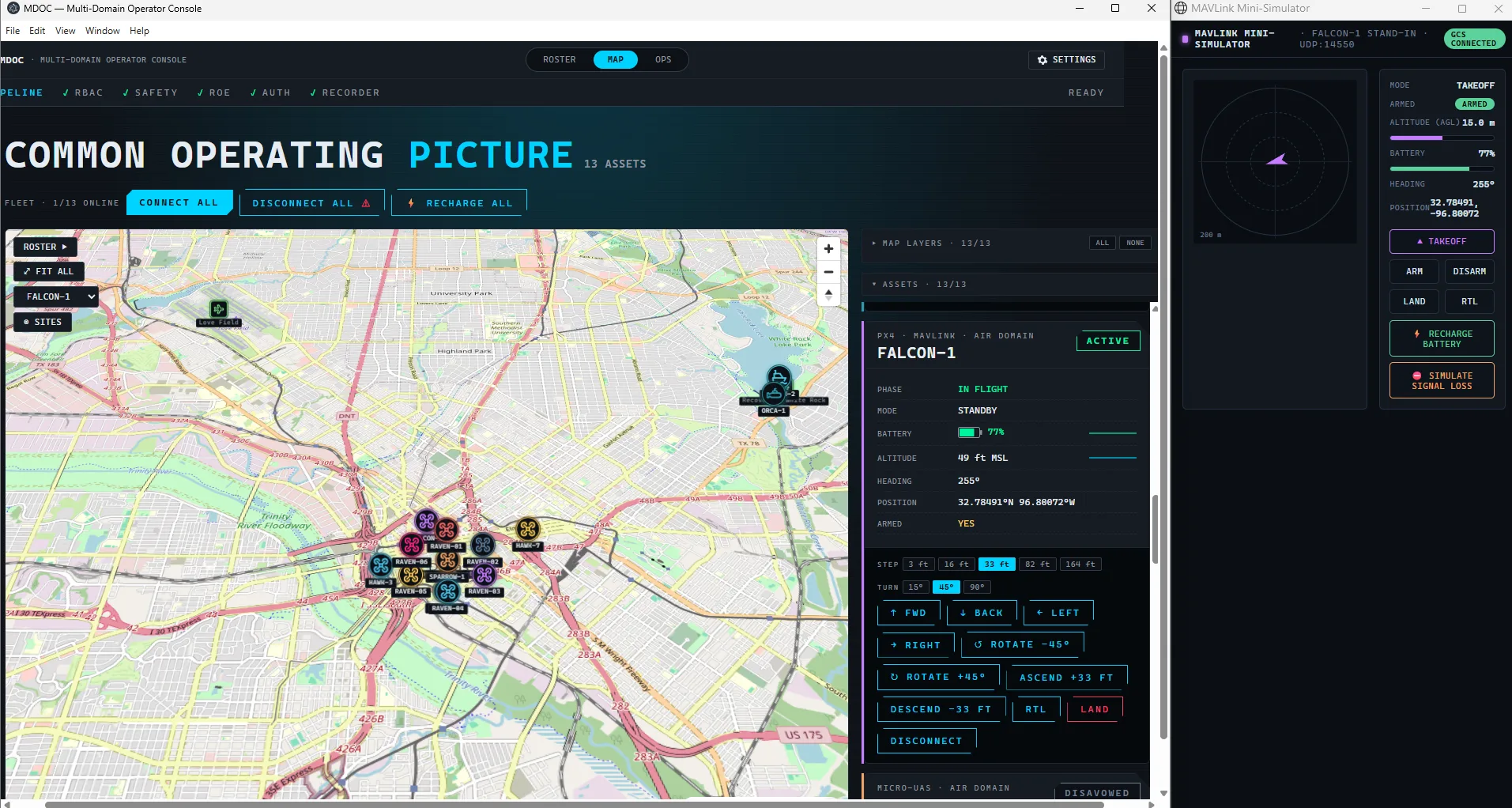
2. A disconnected vehicle kept showing a live battery. I disconnected one and its battery and altitude just… stayed there. Frozen, reading as current, for something no longer connected. The numbers weren't updating and the link really was closed, but a stale reading presented as live is its own hazard on an operations screen. A disconnected vehicle greys out now.
3. A button that couldn't work. The console had a "recharge battery" button on the real-protocol vehicle. It's a simulator-only cheat — you top up a pretend battery — and there's no such thing as a "recharge" command to an actual aircraft. So on that vehicle it did nothing, which reads as broken. The fix was small but clarifying: mark which vehicles are simulated, and only offer the cheat on those. The recharge moved to where it belongs, the simulator's own dashboard, not the command path to the aircraft.
4. Resize the window, lose the panel. Shrink the window and the right-hand roster panel slid off the edge with no scrollbar to chase it. Content silently cut off. The layout now refits down to a sensible minimum and then scrolls, instead of clipping.
5. "The numbers don't match." The console showed altitude as 541. The simulator showed 15. Same vehicle. The console reports altitude in feet above mean sea level, aviation-style; the simulator reported metres above ground level. 541 feet is 165 metres, which is 15 metres above the ground plus 150 metres of ground elevation. Identical data, two conventions. Not a bug so much as a missing piece — the app needs an explicit, operator-chosen unit system, and clear labels for which reference an altitude uses.
What I learned
The tests weren't bad. They were narrow. They exercised the paths I thought to write, and every one of these bugs lived just outside those paths: a zero on the end of a message, a disconnect, a button on the wrong kind of vehicle, a small window, a unit mismatch.
A simulator doesn't think about my assumptions. It just flies, and walks straight into them.
So the value wasn't the pretty dashboard. It was that the simulator made real behaviour cheap to observe — and cheap observation is what turns "the tests pass" into "I watched it work, and fixed the five ways it didn't." On something that commands aircraft, that gap is the whole job.
What's next
Units, properly. An operator-selectable metric/imperial system, one tested conversion helper, and altitudes that say whether they're above ground or above sea level.
Then guided movement, and eventually a full flight against the real autopilot in software — PX4 SITL, end to end. That one hasn't happened yet.
Thoughts?
Comments are threads on GitHub, so a GitHub account is needed to post. No account? Email me instead — I read everything.